Why Restock Alert Lag Drains DTC Waitlist Revenue
Back-in-stock alerts are the highest-intent message a DTC brand sends. When they fire hours late, warm waitlist demand quietly moves to competitors.
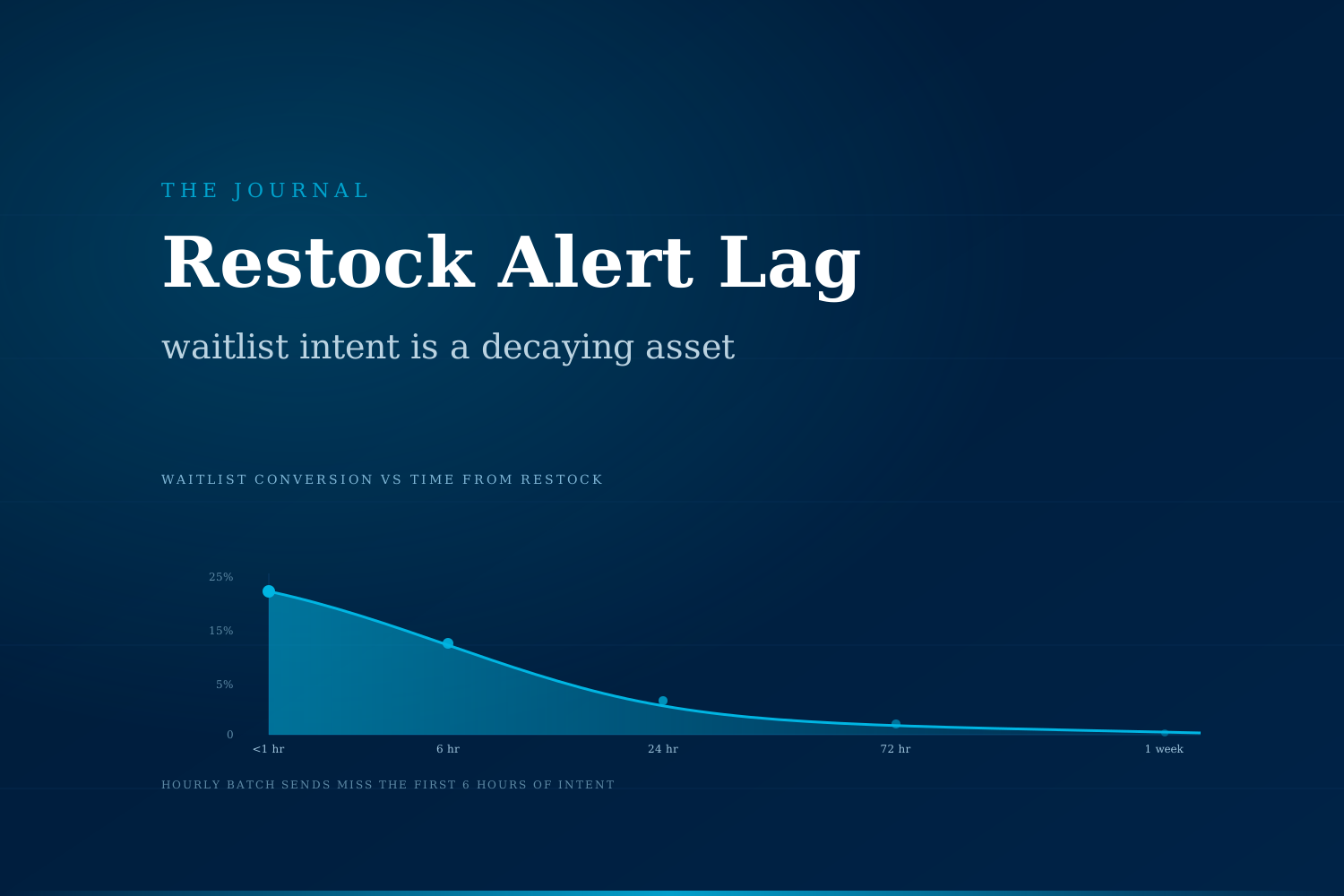
Restock alerts are one of the highest-intent messages a DTC brand ever sends, yet most brands treat them as a batch job fired hours or days after inventory returns. That lag hands warm waitlist demand to competitors and forces the brand to recover the same customer later through paid retargeting. The pattern is measurable, and it is fixable.
What is a restock alert actually worth?
When a shopper taps "notify me when back in stock," they are the closest thing DTC ecommerce has to a pre-qualified lead. They picked the exact SKU, the exact size, and gave contact permission after the product was already sold out. Klaviyo, Yotpo, and Bloomreach have all published benchmark data showing that back-in-stock messages routinely land in the top decile of DTC email performance, often with open rates above 60 percent and click-through rates well above 15 percent.
That performance assumes the alert arrives while the customer still wants the product. Waitlist intent is a decaying asset. Every hour between "inventory returned" and "customer notified" is an hour the shopper might spend on a competitor's PDP, a Reddit thread, or an Amazon listing.
Where does the lag actually come from?
The restock alert stack looks simple on paper: inventory system sees stock come back, sends a flag to the ESP, ESP sends an email or SMS to the waitlist. In practice, several small delays compound.
- Inventory sync cadence. Most DTC brands run stock updates on a fixed schedule (every 15, 30, or 60 minutes). A restock that happens right after a sync waits a full cycle before the ESP even knows about it.
- Batch send windows. ESPs are often configured to hold triggered flows for a quiet-hour window, or to batch back-in-stock sends to protect deliverability. A restock at 2am can get held until 8am, then queued behind promotional sends.
- SKU mapping gaps. If the waitlist is per-SKU but the inventory feed is per-variant, brands often push a manual reconciliation step that adds hours before the right list is even assembled.
- Warehouse timing vs sellable availability. Product enters the warehouse but does not become sellable until the receive-and-putaway cycle finishes. Brands who alert on receipt (not on availability) trigger a race the customer usually loses.
- Waitlist snapshot age. The list of "who wants this SKU" often grows for weeks. When the alert finally fires, the earliest signups have already moved on to another brand.
Each delay alone is small. Stacked, they turn a 60-minute recovery into a 24-hour one.
How does waitlist intent decay over time?
Every category behaves differently, but the shape of the curve is remarkably consistent across DTC verticals. Below is a directional comparison drawn from vendor benchmarks and post-purchase surveys published by ecommerce analytics platforms.
| Time from restock to alert | Typical waitlist conversion | What happened to the customer |
|---|---|---|
| Under 1 hour | 18–25% | Still in active shopping mode, alert lands top of inbox |
| 1–6 hours | 10–15% | Shopping session ended, but purchase intent still intact |
| 6–24 hours | 5–9% | Customer has re-searched the category, encountered alternatives |
| 24–72 hours | 2–5% | Considered a substitute, may have purchased from a competitor |
| Over 72 hours | Under 2% | Effectively re-acquisition, not a waitlist conversion |
The gap between the first row and the fourth is not marginal. On a 500-person waitlist with a $65 AOV, the difference between a one-hour alert and a 24-hour alert is roughly $40,000 in surfaced revenue versus $12,000. That is per SKU, per restock event.
What does the ops team actually see?
Ops leaders rarely see this as a lag problem. It shows up as three separate, unrelated pain signals:
- "Our restock emails have great open rates, but the revenue attribution looks thin."
- "Customer service is fielding 'when will X be back' tickets even after the alert already went out."
- "Paid retargeting spend on the same SKU is climbing faster than restock rate."
Those three signals are the same event viewed from three seats. The waitlist demand did convert, just not to the alert. It converted to a paid retargeting impression, a support ticket response, or a competitor's PDP. The brand paid twice: once to build the waitlist, once to re-acquire the customer.
What changes when alerts fire in minutes, not hours?
The technical fix is well understood. The operational fix (getting the whole stack to react in near real time and prioritize the right customer segments) is where most brands stall. Once that stack is in place, three shifts show up in the P&L:
- Waitlist conversion rate climbs into the 15 to 25 percent range for high-demand SKUs, up from the 3 to 8 percent typical of hourly-batch systems.
- Paid retargeting spend on restocked SKUs drops. The shoppers who would have needed a Meta ad to close are now closing on the alert itself. That budget frees up for prospecting.
- Customer service ticket volume on stock questions falls sharply. Ops teams often report a 30 to 50 percent reduction in "when will X be back" tickets within the first month, because the answer becomes automatic and personal.
The compounding effect is what most brands underestimate. Faster alerts mean higher waitlist trust, which means larger waitlists on future stock-outs, which means more surfaced revenue per SKU cycle.
How do you know your alerts are lagging?
Three checks a DTC ops team can run this week, without changing any tooling:
- Timestamp delta. Pull the last five restock events. Compare "SKU marked available in warehouse" against "first alert delivered to a customer." If the delta averages over one hour, there is meaningful lag.
- Alert-to-purchase window. Look at the median time between alert delivery and the first purchase attributed to that alert. If the median is under 30 minutes, the customers you did reach were still in-market. If it sits above three hours, the alert missed most of the intent window.
- Waitlist-to-conversion ratio. For any SKU with a waitlist of 100 or more, calculate how many of those specific email addresses purchased within 72 hours of the restock. If the number is under 10 percent, the lag is costing more than the alerts are earning.
None of those three checks require new software. They require pulling data that already exists and reading it against the decay curve above.
What most brands try first, and why it stalls
The instinct is usually to shorten the batch interval. Instead of hourly, run it every 15 minutes. That helps at the margin. It does not solve the root problem, which is that inventory events, alert delivery, and customer segmentation live in three different systems that were never designed to talk in real time.
The pattern that actually moves the numbers is a small orchestration layer that watches inventory events, matches them against waitlist segments in near real time, and routes alerts based on both urgency (units in stock) and customer priority (LTV, engagement recency). It is not a new ESP. It is a coordination layer above the tools the brand already owns.
What the cost looks like when left alone
For a $10M DTC brand running 8 to 12 major restock events per quarter, the difference between a near-real-time alert stack and an hourly-batch one typically works out to $150K to $400K per year in surfaced waitlist revenue, plus a paid media saving that lands in a similar range. On a P&L, that is a mid-six-figure line item hiding inside a "restock email" report that already looks healthy on its dashboard.
Most ops leaders never see the number because the missed revenue never enters a dashboard. It goes to a competitor, a retargeting bill, or a support ticket, and each of those buckets has its own explanation ready.
Curious what your restock stack is actually costing you?
We run a completely free automation audit for DTC brands that want a second opinion on the ops flows that quietly move the P&L. No slide deck, no sales pitch. We look at your waitlist, alert latency, and retargeting spend on restocked SKUs, and tell you where the money is going. → Book the audit
Sami Raza
Software Developer & Technical Author
Sami Raza builds AI automation for logistics, DTC, and construction operations teams at ApexifyLabs, and writes about the operational failures that automation is actually worth pointing at.