Equipment Rental Returns: Where GCs Burn Idle Time
Idle days on rental equipment are one of the quietest cost lines on a GC job. Here is where the slip happens and what AI utilization tracking changes.
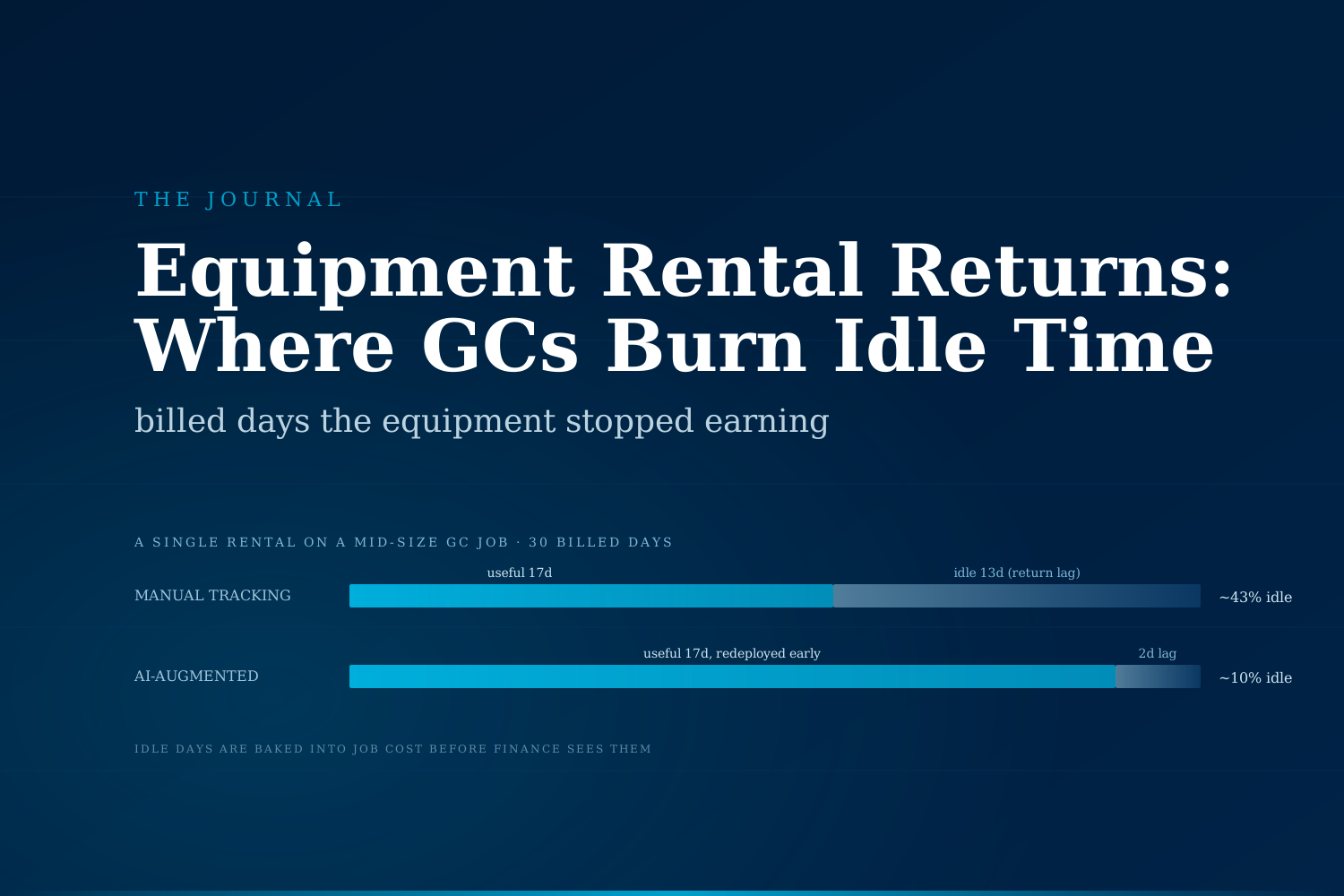
Rental equipment that stays on the jobsite past the day it stopped earning work is one of the most overlooked cost lines in construction. The rental clock keeps running, the foreman has nine other things to track, and the return paperwork sits at the bottom of someone's pile until month-end.
What does equipment rental waste actually look like on a GC job?
For a mid-size general contractor running multiple jobs at once, rental equipment is usually somewhere between five and twelve percent of direct job cost. The lifts, generators, compressors, light towers, and small tools that show up on each project tend to come from a mix of national rental houses and a few regional yards the super has used for years. The line items are predictable. What is not predictable is how long each piece actually stays useful on the active scope, and how long it then sits.
The waste is not the rental itself. It is the gap between the day the equipment finished doing useful work and the day it physically left the jobsite. Industry reporting from the American Rental Association and McKinsey's construction productivity benchmarks have for years flagged equipment utilization as one of the largest improvable categories on jobsites, with idle time on rentals routinely cited at 25 to 40 percent of billed rental days on mid-size projects.
On a $20M project with $1.5M in rentals, even a conservative 15 percent idle slice translates to roughly $225K of cost the owner is paying through a cost-plus structure or the GC is absorbing on a fixed-price job. That number rarely shows up cleanly on a P&L, because it is distributed across dozens of small invoices and tagged to the right cost code only after the fact.
Why do rental returns slip past the date they were useful?
The slip happens for understandable reasons, which is part of why it survives. A few patterns repeat across most jobs.
- Nobody owns the off-rent decision. The foreman who ordered the boom lift is not the same person watching the rental invoice, and the PM watching the invoice is not on site daily to see when the lift stopped moving. Off-rent calls fall into a seam between roles.
- Returns require dispatch coordination. Even when the off-rent decision is made, the rental house needs notice, the yard truck needs to be scheduled, and the equipment needs to be staged at a pickup point on the site. That coordination cost sometimes outruns a single day of rental, so the team waits.
- Optionality keeps it on site. Half the time the lift is left in place because somebody might need it next week for a punch item. It almost never gets used, but the option felt rational at the moment the call was made.
- The invoice arrives weeks later. By the time finance sees the rental on the cost code, the idle period is two or three weeks in the rearview and nobody can reconstruct exactly when the equipment last earned its keep.
None of these are caused by inattention. They are caused by the data being scattered across rental house portals, supers' phones, daily reports, and the GC's accounting system, with no single view of utilization in real time.
How does the manual side of this actually run today?
A typical workflow on a mid-size GC looks like this. The super calls in or emails a rental request. The rental house confirms and delivers. The equipment shows up on the daily report once, and on the rental invoice every Monday afterward. The PM glances at the cost code monthly and notices the rental still on the books. They text the super: "Are we still using the lift?" The super, who has been pulled into three RFI conversations that morning, says "I think so, let me check," and the question gets buried.
Two weeks later, the same exchange repeats. Eventually somebody walks the site, confirms the lift has been parked next to a connex for ten days, and calls for pickup. The cost is already in the job.
The pattern is not unique to lifts. The same shape repeats on light towers after night work ends, on generators after temporary power is replaced by utility power, on compressors after a specific spray scope finishes, and on countless small-tool rentals that accumulate on a closeout job. None of these are individually expensive. Together, on a long job, they are a meaningful number.
What changes when AI tracks rental utilization across jobs?
The point of AI augmentation here is not to take return decisions away from the field. The super still calls the shot. The point is to make sure the field, the PM, and the rental coordinator are all looking at the same picture of which assets are still earning their cost and which are not.
A few patterns become possible once the data is in one place:
- Rental invoices, equipment GPS pings where available, daily report mentions, and PM-coded scope status are reconciled into a single utilization view per asset, per job.
- Assets that have not been mentioned in a daily report or moved by a meaningful telematics signal in five business days surface as candidates for off-rent review.
- The system drafts the return request, queues the dispatch ask to the rental house, and routes a one-tap confirmation to the super before the next billing cycle closes.
- For GCs running multiple jobs, cross-job redeploy opportunities surface automatically, so an idle skid steer on Job A is suggested as a redeploy to Job B before a new rental gets ordered.
The outcome is not a glamorous one. It is a quieter cost line on the monthly job report and a few hours per week back for the PM who used to chase this manually.
Manual vs AI-augmented rental return handling, side by side
| Dimension | Manual tracking | AI-augmented tracking |
|---|---|---|
| Utilization visibility | Monthly, on the cost code report | Real-time, per asset, per job |
| Off-rent trigger | Super noticing the equipment is idle | Automated idle alert with usage context |
| Return coordination | Phone and email, ad hoc | Drafted return request, one-tap confirm |
| Cross-job redeploy | Rarely surfaces in time | Suggested automatically when active assets sit idle |
| PM time per active job | Two to four hours per week | Twenty to thirty minutes per week, exception cases only |
| Idle days per rental | Often 25 to 40 percent of billed days | Reduced toward single-digit percent |
| Cost visibility | Reconstructed at month-end | Visible the day it starts accruing |
Three signs your job is absorbing the idle-rental tax
You do not need a deep audit to spot the pattern. Three observations usually do it.
- Rental as a percent of direct cost trends up over the life of the job. If the rental line was eight percent of cost in month two and eleven percent by month seven, that drift is almost always idle days, not new scope.
- The PM cannot tell you, off the top of their head, which rentals were on site last week without checking the invoice. When the field-cost picture lives only on the back-end report, idle days are invisible until they are paid for.
- Closeout includes a "return everything" sweep that finds rentals nobody remembered. That sweep is the moment the cost finally surfaces, weeks after it stopped being useful.
Any one of these is enough signal to investigate. All three together usually mean the job is paying meaningfully more in distributed idle rental than the team realizes.
What we will not detail in this article
We are not going to walk through the data fields used to reconcile rental house portals, telematics feeds, and daily report extracts, the specific thresholds for flagging idle assets, or the dispatch integration patterns that draft return requests into a rental yard's intake system. Those choices depend on the GC's rental house mix, the telematics maturity of the fleet, and the daily report tooling already in place, and they are precisely what an audit is for.
What is worth saying publicly: every mid-size GC we have looked at had a meaningful idle-rental cost line that was not labeled as such on the job report. None of them had a real-time view of which assets were still earning their cost.
What an AI-augmented rental management program looks like, at a glance
The goal is not to replace the super or the rental coordinator. They already know how the work runs. The goal is to give them a single, current picture of which assets are still earning their cost and which are not, so the off-rent decision happens on the day it should rather than two weeks later. The integration typically takes two to four weeks of work, lives in the background once it is wired in, and shows up to the field as fewer surprise line items at month-end.
If your rental cost line keeps creeping up across the back half of jobs and nobody can tell you cleanly when each asset last earned its rent, the cheapest first move is probably to look at the data, not the yard. We run a completely free automation audit for GCs and subs that want a second opinion on what their rental coordination is actually costing them. No commitment, no slide deck.
Sami Raza
Software Developer & Technical Author
Sami Raza builds AI automation for logistics, DTC, and construction operations teams at ApexifyLabs, and writes about the operational failures that automation is actually worth pointing at.